Releasing a new application update can sometimes introduce unexpected issues that affect all users. That’s why modern companies use Canary Deployment to reduce risks and test updates gradually before a full rollout.
Canary Deployment is a deployment strategy where a new version of an application is released to a small percentage of users first before being rolled out to everyone.
Any issue affects only a limited number of users.
Problems can be discovered before the update reaches all users.
Reduces the chance of complete service outages.
The new version can be disabled quickly if issues appear.
Gradual rollout of the update to a small group of users first.
A complete switch between two separate environments or versions.
Yes, but it becomes more valuable for large-scale applications.
No, but it significantly reduces their impact.
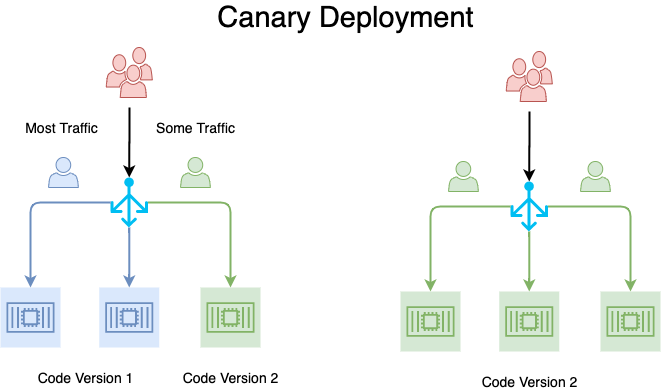
Canary Deployment helps companies release updates more safely, reduce deployment risks, and improve application stability.
 2019 - 2023 © WELNIZ.LTD. All rights reserved.

 United Arab Emirates (Arabic)
 Worldwide (English)