Solid-State Drives (SSDs) offer significantly faster performance than traditional hard drives. However, SSDs rely on flash memory cells that support a limited number of write cycles. Because of this, an important concept known as Write Amplification plays a major role in both SSD performance and lifespan.
Understanding Write Amplification is essential for anyone managing servers, databases, virtualization platforms, or storage-intensive applications.
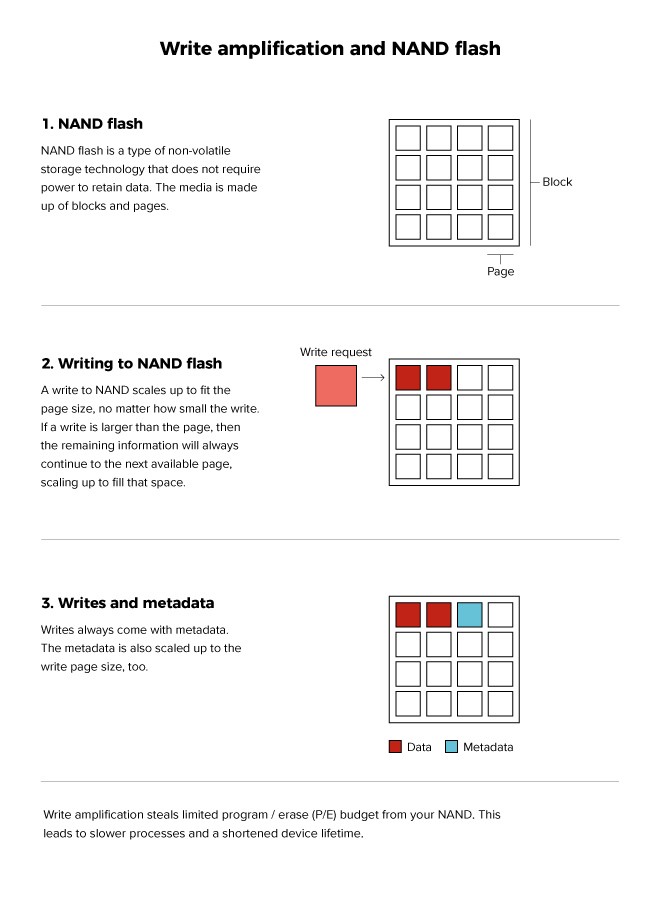
Write Amplification occurs when the amount of data physically written to an SSD is greater than the amount of data the operating system intended to write.
In other words:
If the system requests writing 1 GB of data, the SSD may actually need to write more than 1 GB internally due to its data management processes.
Write Amplification is a consequence of how NAND flash memory works.
Unlike traditional storage media, SSDs cannot simply overwrite existing data. Before writing new data, the drive may need to:
These background activities increase the total amount of physical writing.
Suppose the operating system writes:
But the SSD actually writes:
The Write Amplification Factor (WAF) would be:
Write Amplification = 300 MB ÷ 100 MB = 3
This means the SSD performed three times more write operations than requested.
Additional write operations consume flash memory write cycles more quickly.
Heavy write amplification can reduce performance, especially under sustained workloads.
The SSD controller must perform additional background operations to manage data efficiently.
Write Amplification can have a significant impact on:
These systems generate frequent write operations that can accelerate SSD wear.
TRIM helps the SSD identify unused blocks and manage free space more efficiently.
Reducing small, random, and repetitive write operations can lower write amplification.
Enterprise-grade SSDs are specifically designed to handle heavy write workloads more efficiently.
Caching can reduce the number of direct write operations reaching the storage device.
Keeping spare capacity available allows the SSD controller to perform wear leveling and garbage collection more effectively.
In large-scale environments, Write Amplification can significantly affect:
For this reason, data center operators closely monitor SSD health and write endurance metrics.
Yes. All SSDs experience Write Amplification to some degree, although the impact varies depending on drive quality, controller design, firmware, and workload characteristics.
Yes. Many SSDs expose health and endurance metrics through SMART monitoring tools, allowing administrators to track write activity and drive wear.
Write Amplification is a critical concept for understanding SSD performance and longevity. Because SSDs often write more data internally than the system actually requests, excessive write amplification can reduce lifespan and impact performance. By using techniques such as TRIM, caching, optimized write patterns, and selecting appropriate storage hardware, organizations can minimize its effects and extend the life of their SSD infrastructure.
 2019 - 2023 © WELNIZ.LTD. All rights reserved.

 United Arab Emirates (Arabic)
 Worldwide (English)